QVC Mobile Shopping (US)
- 4.2
- Rating
- 1.00M
- Installs
- Free
- Price

 Analysis by App-foxy
I usually approach shopping apps with one question: do they make buying something easier than using a browser, or do they simply place a website inside a smaller screen? After spending time with QVC Mobile Shopping, I found that its value depends heavily on how you like to shop. It is most useful when you already enjoy browsing QVC’s presentation-led selection and want a quicker way to check products, follow what is currently being shown, and complete a purchase from a phone. It is less convincing if you prefer fast comparison shopping, a broad marketplace, or a minimalist checkout.
This is a free shopping app from QVC, Inc., aimed at an Everyone audience. It has been available since June 3, 2010, and its Android listing identifies it as QVC for Android. The current release is version 5.30.0, with Android 9 or later required. That combination matters because the app is not aimed only at brand-new phones; people using an older but still supported Android device may be able to install it without replacing their handset.
Its public reception is generally positive, with a 4.2 average from around 31 thousand ratings and roughly 11 thousand written reviews. The app has passed the one-million-install mark, so it is not an obscure shopping experiment. Still, popularity does not remove the practical questions: how smoothly does it behave when you are trying to buy something, what should you check when a screen refuses to load, and when is a normal browser or another retailer a better choice?
You May Also Like

 Blood Strike: 2.5 Anniversary
Blood Strike’s Loadouts Turn Every Drop Into a Tactical Gamble
A close look at Blood Strike’s custom loadouts: how fast access to signature weapons reshapes its battle royale rhythm, rewards preparation, and narrows the gap between fights.

 Pandora - Music & Podcasts
Pandora’s Music Is Easy to Start, but Harder to Recover
Pandora’s strength is its low-effort path from a seed to a station. Its weak spot is how much confidence it asks you to place in connection, setup, and quiet recovery.

 8 Ball Pool
 Is Built on Rivalries, Rematches, and Routine
A close look at the rivalries, rematches, shared routines, and unanswered safety questions that turn a quick pool match into a persistent mobile community.

 Samsung Music
’s Quiet Strength Is Playing What You Already Own
Its reach comes less from spectacle than from dependable access to a personal library. That simplicity is both the app’s strongest retention engine and its ceiling.

 AccuWeather: Weather Radar
AccuWeather Review: A Quick, Clear Forecast for Everyday Decisions
For everyday plans, the best forecast is the one you can understand quickly. AccuWeather makes rain timing, radar, and local conditions easy to act on, with a few trade-offs.

 Hill Climb Racing
Why Hill Climb Racing Still Turns Crashes Into One More Run
A tiny car, a bumpy hill and one more upgrade: Hill Climb Racing keeps resurfacing because its simple chaos makes every near-miss feel personal.
More From Our News Desk



Where shopping tends to get stuck
The first friction point is often not the product itself but the transition between browsing and buying. QVC’s shopping style encourages you to look at products in context rather than treating every item as a bare title, photo, and price. That can be helpful when demonstrations or presentation details influence your decision, but it also means the experience may feel slower than searching a conventional retail catalog. If you arrive with a precise model number and want the shortest possible route to checkout, the app can feel more involved than necessary.
I also found that mobile shopping requires a little more attention than casual scrolling. Product choices, delivery details, payment information, and the final order review all deserve a deliberate check. On a phone, it is easy to tap through a page while distracted and overlook a selected color, size, quantity, or delivery option. My practical advice is to pause on the final review screen and read the order as if you were checking a paper receipt. This is especially important when you have been watching a presentation and are buying because an offer feels urgent.
Another common sticking point is confusing a temporary loading problem with a failed order. A slow product image, an unresponsive button, or a delayed confirmation does not automatically mean that the purchase did not go through. Repeatedly tapping the purchase control is a poor recovery strategy because it can create uncertainty about duplicate orders. I would first wait briefly, look for an order confirmation or account update, and only then try again. That small habit is more valuable than it sounds in any shopping app, but it matters particularly when the presentation encourages quick decisions.
Search behavior can also shape your impression. QVC is not the same as a general-purpose marketplace where dozens of sellers compete for the same keyword. The app makes more sense when you are interested in QVC’s own assortment and shopping format. If you search with a vague term, you may need to browse several related results before finding the exact item you had in mind. I see that as a trade-off rather than a defect: the app supports discovery, while a traditional retailer may be better for direct, specification-first shopping.
What I check before blaming the app
When a page does not open correctly, I start with the basics. I check whether other apps can reach the internet, switch between Wi-Fi and mobile data if available, and retry the same screen once rather than repeatedly pressing controls. A product page that loads halfway may simply be dealing with a weak connection. Closing and reopening the app can clear a temporary display state, while restarting the phone is a reasonable next step if several apps are behaving strangely.
The Android requirement is another useful setup check. The app supports Android 9 and newer, so a device running an earlier release is not a good candidate for installation. If the phone meets that requirement but the app still refuses to install or update, I would check available storage, the device’s system update status, and whether the app store itself is functioning normally. These checks are mundane, but they separate an app-specific issue from a phone-wide problem.
I would also install the latest available version rather than judging an old copy. Version 5.30.0 is the current release identified for this review, and staying current is sensible for a shopping app because sign-in, checkout, and page compatibility can be affected by changes elsewhere in the mobile environment. If an update has just been installed and something looks unusual, closing the app completely and opening it again is a safer first move than immediately clearing every piece of stored app information.
Be careful with more drastic troubleshooting. Clearing app storage or uninstalling may remove local session details and force you to sign in again. I would only do that after confirming that I know the account credentials and after checking whether the problem is limited to one screen. A shopping app should not require complicated maintenance for ordinary use, so escalating too quickly can create more inconvenience than it solves.
Notifications and background behavior are worth treating as convenience settings, not proof that the app is broken. If you do not see an alert, open the app directly and check the relevant account or shopping area instead of assuming that an order or product update failed. Phone-level notification controls, battery restrictions, and quiet modes can all affect alerts. The key point is to verify important information inside the account or order flow rather than relying on a pop-up.
A calmer way to recover a disrupted purchase
My preferred workflow starts before checkout. I open the product page, confirm that it is the item I actually want, and note the important selection details before moving forward. If I am interrupted, I do not assume that the cart or checkout state is unchanged. I return to the product and review the selection again. This is slower than tapping quickly, but it prevents the most avoidable mobile-shopping mistakes.
If the app freezes during browsing, I close it and reopen it, then return to the product rather than repeatedly refreshing a half-loaded screen. If the problem occurs only on one network, I test another connection. If every other app works and only this one fails, an app restart or update check is reasonable. If multiple apps cannot connect, I focus on the phone or network first. This simple sequence avoids wasting time on account changes when the real issue is connectivity.
Checkout deserves a separate recovery plan. After a failed-looking payment step, I check whether the app has returned to the cart, whether an order confirmation is visible, and whether the account reflects a recent purchase. I avoid submitting the same order several times until I have checked those places. If the app sends me back to an earlier step, I review the cart contents and selected options from the beginning. A recovery process should reduce uncertainty, not add more taps.
There is also a useful distinction between a saved cart and a completed order. A product remaining in a cart does not by itself prove that payment succeeded, while a confirmation screen or account record is stronger evidence that the process finished. I would treat the cart as a planning area and the order record as the place to verify completion. That mental separation helps when a connection drops at exactly the wrong moment.
For browsing sessions that are likely to be interrupted, I recommend making decisions in stages. First identify the product, then check its details, then proceed to checkout only when you have time to review the final information. This is particularly practical on a phone shared with other tasks, such as commuting, cooking, or watching television. QVC’s format can encourage impulse buying, so creating a short pause before payment is not only a technical safeguard; it is good shopping discipline.
When the problem is outside the app
Some apparent app failures are really account or device issues. A forgotten password, an expired payment method, or an address that needs attention can stop a purchase even when product pages load normally. If browsing works but the process fails at sign-in or payment, I would focus on that specific step instead of reinstalling the entire app. Reinstalling cannot correct an incorrect account detail.
Screen size and keyboard behavior can create their own obstacles. Small displays make long forms tiring, and an on-screen keyboard can cover the button you need. Rotating the phone, dismissing the keyboard, or scrolling deliberately may reveal controls that seemed missing. I also avoid using autofill blindly for addresses and payment fields; autofill is convenient, but it can insert an outdated detail that only becomes obvious at the final review.
If images or video-like shopping content appear slowly while text loads, that points more toward connection quality or temporary service demand than a broken product listing. I would test another network and give the page a moment before deciding that the item is unavailable. Conversely, if the same product behaves normally elsewhere but not in the app, using the mobile browser as a temporary workaround is sensible. The goal is to complete an informed purchase, not to prove loyalty to one access method.
There are cases where another shopping route is simply better. For exact technical comparisons, a retailer with dense specifications and side-by-side filters may save time. For the lowest price across many sellers, a broad marketplace or price-comparison tool is more appropriate. For someone who prefers to inspect products in person, no mobile shopping app can replace a physical store. QVC Mobile Shopping is strongest when its presentation and curated shopping environment are part of what you want, not when you are trying to reduce every purchase to a rapid search result.
Who will get the most from it
I think the app suits shoppers who already recognize QVC’s style and appreciate browsing products through demonstrations, explanations, and a more guided retail experience. It is also useful for people who want a dedicated Android route to QVC rather than relying on a desktop computer. Because it is free, trying it does not require an upfront purchase, and the Everyone rating makes it broadly accessible for ordinary household shopping.
A realistic scenario would be browsing from the sofa while a product presentation is on, opening the item in the app to inspect it more closely, and saving the purchase decision until you can review the details calmly. Another is checking an item while away from a computer, then completing the order from the phone after confirming the selection. In both cases, the app’s advantage is continuity between viewing and shopping, not necessarily speed.
I would be more cautious about recommending it to someone who dislikes promotional presentation, wants a completely neutral catalog, or compares several competing sellers before every purchase. That shopper may find the experience too guided. It is also not my first choice for urgent purchases where the main requirement is a simple, fast transaction. A standard retailer app with a focused search and a shorter path to checkout may be less distracting.
The audience rating and broad install base suggest that the app is suitable for general users, but suitability still depends on shopping habits. A new smartphone user may appreciate the familiar, visual approach, while an experienced bargain hunter may miss advanced comparison tools. The important question is not whether the app can sell products; it clearly exists for that purpose. The question is whether QVC’s way of presenting products matches how you make buying decisions.
My practical verdict after using it
QVC Mobile Shopping is a credible free shopping app with a clear identity. It brings QVC’s Android shopping experience to supported phones and works best as a companion for product discovery and guided purchasing. I like it more when I have time to browse and evaluate an item than when I need a bare-bones checkout. That distinction explains both its appeal and its limitations.
The most useful habit is to slow down at the moments that matter: confirm the Android version before installing, check the network before blaming the app, review selections before payment, and verify an order through the account or confirmation rather than tapping again after a delay. These steps address the kinds of friction that can make an otherwise straightforward shopping session feel unreliable.
My recommendation is therefore conditional but positive. If you enjoy QVC’s product-led shopping format, want a dedicated mobile option, and are comfortable taking a moment to review your order, I think it is worth trying. If you want broad marketplace comparison, highly technical filtering, or the shortest possible route from search to purchase, another retailer’s app or a browser may serve you better. The app is at its best when convenience means staying close to QVC’s shopping experience, not when convenience means removing every step.
With that expectation set, the 4.2 average and more than one million installs feel consistent with my experience: this is a useful, established option for the right kind of shopper, but not a universal replacement for every way of buying online. I would keep it installed if QVC’s presentations regularly influence what I want to explore. Otherwise, I would use it selectively and switch to a more comparison-focused alternative whenever speed, specifications, or competing prices mattered more than the guided experience.
FAQs for QVC Mobile Shopping (US)
01What is QVC Mobile Shopping (US), and what can I do with the app?
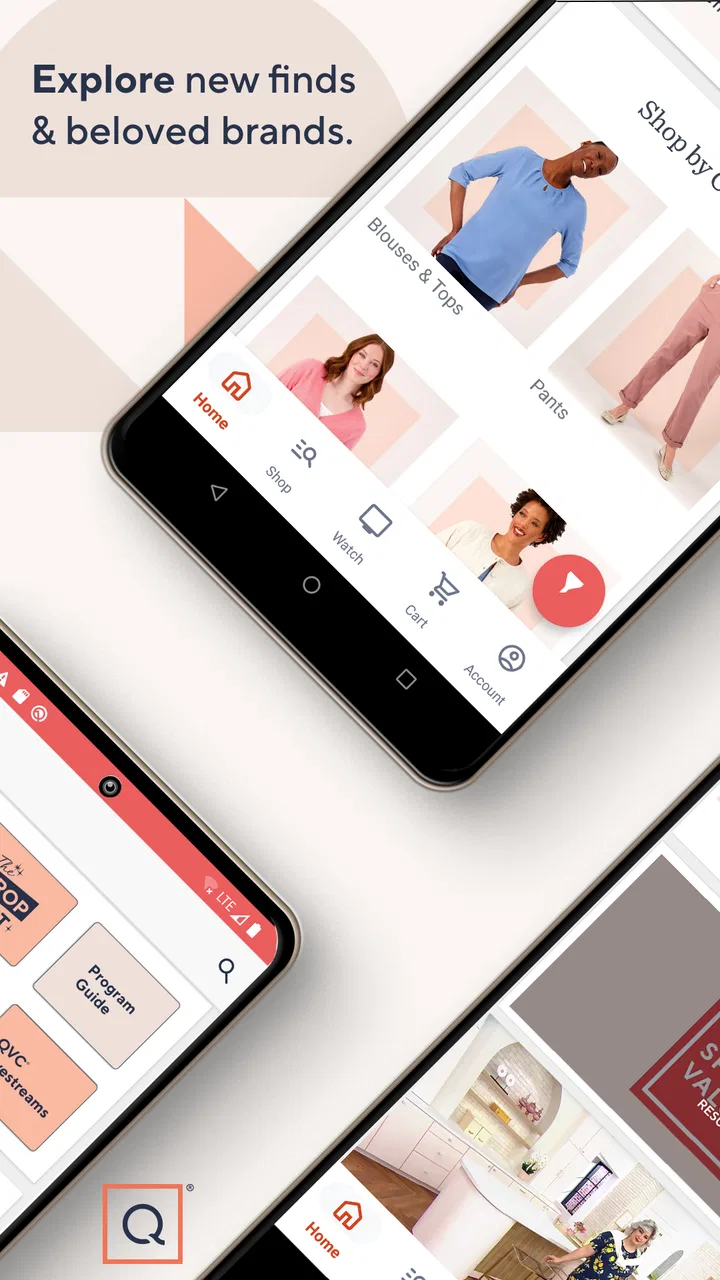
QVC Mobile Shopping (US) is the official shopping app for browsing and purchasing products featured by QVC in the United States. After installing it, you can explore categories such as fashion, beauty, electronics, home goods, and jewelry, watch product presentations, read descriptions and reviews, save items, and place orders directly from your phone. It is designed to bring much of the QVC television shopping experience to a mobile device.
02Do I need a QVC account to use the QVC Mobile Shopping app?
You can generally browse products, watch available content, and search the catalog without immediately creating an account. However, an account is useful if you want to save favorites, manage your shopping cart across devices, view order history, store delivery information, or complete purchases more conveniently. Before ordering, check that your account and billing details are accurate, since mistakes may affect payment processing or shipping.
03Can I watch live QVC programming and product demonstrations in the app?
The app typically provides access to live or on-demand QVC programming, depending on availability, location, and current service support. This can be helpful when you want to see a product demonstrated rather than relying only on photographs and written specifications. Video quality may depend on your internet connection, and some content or features can change over time, so the exact viewing options may vary.
04How do payments, shipping, returns, and order tracking work through QVC Mobile Shopping?
Purchases are handled through QVC’s shopping system, where you can review product pricing, available payment methods, delivery charges, and estimated shipping information before confirming an order. Once an order is placed, tracking and status details are normally available through the app or your QVC account. Return eligibility, deadlines, exclusions, and possible fees depend on the item and QVC’s current policy, so read the applicable terms before buying.
05Is QVC Mobile Shopping (US) safe to download and use?
The official QVC Mobile Shopping app is intended to provide a secure way to browse products and shop from a mobile device, but you should download it only from the verified Google Play Store or Apple App Store listing. Keep your operating system and the app updated, use a strong account password, and avoid entering payment details on suspicious links. Also review requested permissions and QVC’s privacy information before using the app.
Pros
- Easy access to QVC’s live shopping shows and product presentations.
- Convenient browsing across fashion
- beauty
- electronics
- and home categories.
- Product videos and demonstrations help explain features before buying.
- Saved payment and shipping details can speed up repeat purchases.
- Order tracking makes it simple to monitor delivery progress in the app.
Cons
- Some products may cost more than similar items from other retailers.
- Live video content can use significant mobile data and battery power.
- The large product catalog may make finding specific items time-consuming.
- Availability
- pricing
- and delivery options are limited to the U.S. market.
- App performance may vary on older devices or slower internet connections.

QVC Mobile Shopping (US)
Gallery